<?xml version="1.0" encoding="utf-8"?><feed xmlns="http://www.w3.org/2005/Atom" ><generator uri="https://jekyllrb.com/" version="4.4.1">Jekyll</generator><link href="https://ckardaris.github.io/feed.xml" rel="self" type="application/atom+xml" /><link href="https://ckardaris.github.io/" rel="alternate" type="text/html" /><updated>2026-06-20T06:33:55+00:00</updated><id>https://ckardaris.github.io/feed.xml</id><title type="html">Charalampos Kardaris’ blog</title><author><name>Charalampos Kardaris</name></author><entry><title type="html">The P in PGP isn’t for pain: encrypting emails in the browser</title><link href="https://ckardaris.github.io/blog/2026/02/07/encrypted-email.html" rel="alternate" type="text/html" title="The P in PGP isn’t for pain: encrypting emails in the browser" /><published>2026-02-07T00:00:00+00:00</published><updated>2026-02-07T00:00:00+00:00</updated><id>https://ckardaris.github.io/blog/2026/02/07/encrypted-email</id><content type="html" xml:base="https://ckardaris.github.io/blog/2026/02/07/encrypted-email.html"><![CDATA[<p>In my previous post, I described how I implemented an asynchronous, <a href="/blog/2026/01/22/my-comments-run-on-email.html">email-based comment system</a> for this blog that runs without a true backend.
Every comment is an email sent to a specified address.
After each email is processed, all information is stored publicly in a GitHub repository.</p>

<p>One of the limitations of such a system is user authentication.
Each user needs to send a password alongside each comment that serves to authenticate the user
against their email.
This is needed because <em>email spoofing</em> is a thing and identity theft is not a joke; even if the
stakes are low in the context of blog comments.</p>

<p>In that previous post, I acknowledged that sending a password in plain text via email is not best
practice and I encouraged the usage of encryption.
For this purpose, I provided a <a href="/pgp-public-key.txt">public PGP key</a> that can be used to encrypt any
email and can only be decrypted by me, the owner of the secret key.</p>

<h1 id="problem">Problem</h1>

<p>The problem with this suggestion is that, even though it’s technically sound and legitimate, it is
not straightforward to set up.
Many email clients do not even support PGP encryption and, dare I say, even most technical people do
not have it set up by default.
For non-technical users, configuring everything properly would certainly be a test of computer
literacy.</p>

<p>This is not good enough, and certainly not welcoming or inclusive.</p>

<h1 id="solution">Solution</h1>

<p>Shortly after I published the first version of the comment system I came up with a question.</p>

<blockquote>
  <p>I already have a public PGP key published and ready to be used.
Is there a way to encrypt the comment payload on the browser, including the password and all other
data?</p>
</blockquote>

<p>I wouldn’t be writing this post if the answer was negative.</p>

<p>After a quick web search, I came across <a href="https://openpgpjs.org/">openPGP.js</a>, a JavaScript library
maintained by the <a href="https://proton.me/">Proton team</a>.
The goal of the library is to <em>“bypass the PGP installation requirement in every machine”</em>.
Just perfect for my use case.</p>

<p>I quickly set everything up.
I downloaded the JavaScript library files at the root of my website and created a couple of helper
functions.
The first to load the library on-demand to avoid unnecessary network transactions and the
second to produce a PGP encrypted message from a plain text string input.</p>

<div class="language-js highlighter-rouge"><div class="highlight"><pre class="highlight"><code><span class="kd">function</span> <span class="nf">loadScript</span><span class="p">(</span><span class="nx">src</span><span class="p">)</span> <span class="p">{</span>
    <span class="k">return</span> <span class="k">new</span> <span class="nc">Promise</span><span class="p">((</span><span class="nx">resolve</span><span class="p">,</span> <span class="nx">reject</span><span class="p">)</span> <span class="o">=&gt;</span> <span class="p">{</span>
        <span class="c1">// Prevent loading the same script twice</span>
        <span class="k">if </span><span class="p">(</span><span class="nb">document</span><span class="p">.</span><span class="nf">querySelector</span><span class="p">(</span><span class="s2">`script[src="</span><span class="p">${</span><span class="nx">src</span><span class="p">}</span><span class="s2">"]`</span><span class="p">))</span> <span class="p">{</span>
            <span class="nf">resolve</span><span class="p">();</span>
            <span class="k">return</span><span class="p">;</span>
        <span class="p">}</span>

        <span class="kd">const</span> <span class="nx">script</span> <span class="o">=</span> <span class="nb">document</span><span class="p">.</span><span class="nf">createElement</span><span class="p">(</span><span class="dl">'</span><span class="s1">script</span><span class="dl">'</span><span class="p">);</span>
        <span class="nx">script</span><span class="p">.</span><span class="nx">src</span> <span class="o">=</span> <span class="nx">src</span><span class="p">;</span>
        <span class="nx">script</span><span class="p">.</span><span class="k">async</span> <span class="o">=</span> <span class="kc">true</span><span class="p">;</span>
        <span class="nx">script</span><span class="p">.</span><span class="nx">onload</span> <span class="o">=</span> <span class="nx">resolve</span><span class="p">;</span>
        <span class="nx">script</span><span class="p">.</span><span class="nx">onerror</span> <span class="o">=</span> <span class="nx">reject</span><span class="p">;</span>
        <span class="nb">document</span><span class="p">.</span><span class="nx">head</span><span class="p">.</span><span class="nf">appendChild</span><span class="p">(</span><span class="nx">script</span><span class="p">);</span>
    <span class="p">});</span>
<span class="p">}</span>

<span class="k">async</span> <span class="kd">function</span> <span class="nf">encrypt</span><span class="p">(</span><span class="nx">message</span><span class="p">)</span> <span class="p">{</span>
    <span class="kd">const</span> <span class="nx">publicKeyArmored</span> <span class="o">=</span> <span class="s2">`{% include pgp-public-key.txt %}`</span><span class="p">.</span><span class="nf">trim</span><span class="p">();</span>

    <span class="k">await</span> <span class="nf">loadScript</span><span class="p">(</span><span class="dl">'</span><span class="s1">/openpgp.min.js</span><span class="dl">'</span><span class="p">);</span>

    <span class="k">return</span> <span class="k">await</span> <span class="nb">window</span><span class="p">.</span><span class="nx">openpgp</span><span class="p">.</span><span class="nf">encrypt</span><span class="p">({</span>
        <span class="na">message</span><span class="p">:</span> <span class="k">await</span> <span class="nx">openpgp</span><span class="p">.</span><span class="nf">createMessage</span><span class="p">({</span> <span class="na">text</span><span class="p">:</span> <span class="nx">message</span> <span class="p">}),</span>
        <span class="na">encryptionKeys</span><span class="p">:</span> <span class="k">await</span> <span class="nb">window</span><span class="p">.</span><span class="nx">openpgp</span><span class="p">.</span><span class="nf">readKey</span><span class="p">({</span> <span class="na">armoredKey</span><span class="p">:</span> <span class="nx">publicKeyArmored</span> <span class="p">})</span>
    <span class="p">});</span>
<span class="p">}</span>
</code></pre></div></div>

<p>It’s simple.
And it works.</p>

<blockquote>
  <p><strong>Note:</strong> The comment encryption functionality is not available if <em>JavaScript</em> is disabled on the
client.</p>
</blockquote>

<p>For example, if you were to write a comment for this post using the <em>comment form</em> and provided the
following data:</p>
<div class="language-plaintext highlighter-rouge"><div class="highlight"><pre class="highlight"><code>username: test_user
password: test_password
comment: Test comment.
</code></pre></div></div>
<p>the email to be sent would be pre-filled with the following body:</p>
<div class="language-plaintext highlighter-rouge"><div class="highlight"><pre class="highlight"><code>Your comment has been encrypted and is ready to be submitted.
...

-----BEGIN PGP MESSAGE-----

wV4Dyk92dA2JWC4SAQdAFgNHlb6Q7nAgovzVgUnB5CTOKBWSlXxSoIOzLUQl
Zm4wBdsLdUROxNS0xcTyja4iq9QUsSazv18DYbmRd2Lix3XoL4zDrQVOPVw6
ZGlkeDhi0qEByCityS59xWSuREVqgS4tpPlZg8Lz5Go6D2nSBu+1iTXw2dy6
L9eL5NZMoFhYUqocGukxBlEcHY6j1U+3Lstvc5dZPl+u7+Zh32uTzTo8CC05
doKNwH5AP9ybHk7nr2vVLdrede6vLCIAwGTK9fVYq2V1udXfSPNCESSeunh1
68qEaAA81mjCbSSfcB/RznpL8/nOLLWDXlXxfMPlYV8/+Q==
=k2VX
-----END PGP MESSAGE-----
</code></pre></div></div>
<p>Your comment data (username, password, message, etc.) is automatically encrypted without any
need for manual intervention.</p>

<h1 id="conclusion">Conclusion</h1>

<p>Based on the above proof of concept, I can say that, even without operating a “proper” backend
server, it is still possible to guarantee a reasonable level of security.
And you can do so without requiring any complicated setup on the user side.</p>

<p>To my eyes, this is a win for secure communication when email is used as the medium.
Do you agree?</p>]]></content><author><name>Charalampos Kardaris</name></author><category term="blog" /><category term="programming" /><category term="security" /><category term="website" /><summary type="html"><![CDATA[How to receive encrypted messages via emails with openPGP.js]]></summary></entry><entry><title type="html">My comments run on email</title><link href="https://ckardaris.github.io/blog/2026/01/22/my-comments-run-on-email.html" rel="alternate" type="text/html" title="My comments run on email" /><published>2026-01-22T00:00:00+00:00</published><updated>2026-01-22T00:00:00+00:00</updated><id>https://ckardaris.github.io/blog/2026/01/22/my-comments-run-on-email</id><content type="html" xml:base="https://ckardaris.github.io/blog/2026/01/22/my-comments-run-on-email.html"><![CDATA[<p>Not all blogs support commenting.
Initially, I considered doing without them.
There are many places where one may share an article or blog post and start a discussion.
I frequent <a href="https://news.ycombinator.com/news"><em>Hacker News</em></a><sup id="fnref:1"><a href="#fn:1" class="footnote" rel="footnote" role="doc-noteref">1</a></sup> myself and I really appreciate the
breadth of opinions in some of the discussions.
Discussion can happen in other <em>spaces</em> as well, like <em>Reddit</em>, <em>LinkedIn</em><sup id="fnref:2"><a href="#fn:2" class="footnote" rel="footnote" role="doc-noteref">2</a></sup> and many more.</p>

<p>Despite the abundance of such <em>spaces</em>, where discussions can happen, I think it is convenient and
fitting — especially for blog posts — when the actual post and the readers’ comments live
together.</p>

<p>With that in mind, and feeling the urge to <a href="/blog/2026/01/10/techrastination.html">hack a little more on my website</a>, during the past weekend I set out to add support for comments in
this blog.</p>

<p>Doing so in a static blog poses a big <strong>challenge</strong>.
There is no actual server running that can handle requests and process data.
That means that you do not have the necessary infrastructure for user accounts.
The readers cannot log in and send their comments and there is no straightforward way to take those
comments and automatically post them online.</p>

<p>Another method is therefore needed to receive the comments and provide them as input to the static
site generator, in my case <a href="https://jekyllrb.com/">jekyll</a>.</p>

<p>One of the most frequently used solutions to this problem is <a href="https://giscus.app/">giscus</a>.
<em>giscus</em> is utilizing <em>GitHub</em> discussions to store comments for the different blog posts and can be
configured to automatically update your website when a new comment is created.</p>

<p>This approach is very appealing, but it has one disadvantage in my opinion.
The person who wants to comment needs to have a <em>GitHub</em> account.
This can be a blocker for non-technical people.</p>

<p>I wanted to use a different approach and I also wanted to make commenting accessible to as many
people as possible.
After some thinking I decided to use the most common technology I could think of.</p>

<p><strong>Email.</strong></p>

<p>Almost everyone using the internet has an email address.
By basing my comment system on email, I can make it accessible to a wide range of people.</p>

<p>The fact that every email address is unique allows to implement a kind of primitive authentication
setup.
I am saying primitive, because email is not secure by default, and by extension neither is any
system built on top of it.</p>

<p>It goes without saying that this system could never be used in production in security-sensitive
environments. That said, crazier things have happened.</p>

<h1 id="technical-overview">Technical overview</h1>

<p>At this point, it would be useful to go in a little more detail.
If you are not interested in the technical aspects of the comment system implementation you can skip
this section and go straight to the <a href="#final-thoughts">end</a>. You will miss all the fun, though.</p>

<p>So, how does it all work?</p>

<h2 id="requirements">Requirements</h2>

<p>Before implementing the comment system, I drafted some requirements:</p>

<ol>
  <li>All comments should be displayed with a visible <em>name</em><sup id="fnref:3"><a href="#fn:3" class="footnote" rel="footnote" role="doc-noteref">3</a></sup> selected by the commenter and the
<em>date</em> they were made.</li>
  <li>A commenter should be able to change their visible <em>name</em>.</li>
  <li>A malicious actor should not be able<sup id="fnref:4"><a href="#fn:4" class="footnote" rel="footnote" role="doc-noteref">4</a></sup> to assume the identity of a commenter.</li>
  <li>Sending a comment should be as easy as possible and the comment system should be functional with
<em>JavaScript</em> disabled.</li>
  <li>Comment replies should be supported and presented in a nested tree structure, which should
support collapse and expansion of comment sub-trees.</li>
</ol>

<h2 id="data">Data</h2>

<p>The comment system is based on email, so it is logical that you send a comment by sending an email.
Every comment email contains all necessary information, so that the comment can be presented
correctly.
I decided to send the information in the <em>YAML</em> format, since <em>jekyll</em> is <em>YAML</em>-friendly.
Additionally, <em>YAML</em> compared to <em>JSON</em> can be more readable for multi-line data, like comments, so
it made it more fitting for this use case.</p>

<p>Every comment email sends in its body the following information.</p>
<div class="language-yaml highlighter-rouge"><div class="highlight"><pre class="highlight"><code><span class="na">post</span><span class="pi">:</span>
<span class="na">name</span><span class="pi">:</span>
<span class="na">password</span><span class="pi">:</span>
<span class="na">repliesTo</span><span class="pi">:</span>
<span class="na">comment</span><span class="pi">:</span> <span class="pi">|-</span>
</code></pre></div></div>

<p>Sending passwords in plain text is almost always frowned upon.
But I believe this situation deserves some leeway.</p>

<ul>
  <li>The data transferred is not sensitive and proper care is taken to ensure confidentiality.</li>
  <li>This is an educational project with no hard security requirements.</li>
  <li>A password is good to be used as a measure against <a href="https://en.wikipedia.org/wiki/Email_spoofing">sender address
spoofing</a>.</li>
  <li>Email can always be hardened by using <a href="https://en.wikipedia.org/wiki/Pretty_Good_Privacy"><em>PGP
encryption</em></a><sup id="fnref:5"><a href="#fn:5" class="footnote" rel="footnote" role="doc-noteref">5</a></sup>:</li>
</ul>

<p>Upon receiving a comment email, some additional information can be obtained: <code class="language-plaintext highlighter-rouge">email_address</code> and <code class="language-plaintext highlighter-rouge">date</code>.</p>

<h2 id="implementation">Implementation</h2>

<p>Let’s see how we can satisfy the system requirements with these data.</p>

<blockquote>
  <p>All comments should be displayed with a visible name selected by the commenter and the
   <em>date</em> they were made.</p>
</blockquote>

<p>For this we use the <code class="language-plaintext highlighter-rouge">name</code> and <code class="language-plaintext highlighter-rouge">date</code> information from the actual comment email.</p>

<blockquote>
  <p>A commenter should be able to change their visible name.<br />
A malicious actor should not be able to easily assume the identity of a commenter.</p>
</blockquote>

<p>All information needed to generate this website is publicly stored in a <em>GitHub</em> repository.
This means that any personal information needs to be properly stored.</p>

<p>For each received comment email a <a href="https://en.wikipedia.org/wiki/SHA-2"><em>SHA256</em></a> message digest
(<em>hash</em>) is computed using the <code class="language-plaintext highlighter-rouge">email_address</code> and a
<a href="https://en.wikipedia.org/wiki/Salt_%28cryptography%29"><em>salt</em></a><sup id="fnref:7"><a href="#fn:7" class="footnote" rel="footnote" role="doc-noteref">6</a></sup>.</p>

<p>To check <em>name</em> availability, all <em>email hashes</em> that are <strong>different</strong> from the current one are
gathered and their linked <em>name</em> is compared to the requested one.
If no matches are found the <code class="language-plaintext highlighter-rouge">name</code> can be used.</p>

<p>An additional message digest is computed for the authentication of the commenter using the
<code class="language-plaintext highlighter-rouge">email_address</code>, the <code class="language-plaintext highlighter-rouge">password</code> and the <em>salt</em>.</p>

<p>This <em>authentication hash</em> is compared against the <em>authentication hash</em> of one of previous comment
emails that share the <strong>same</strong> <em>email hash</em><sup id="fnref:8"><a href="#fn:8" class="footnote" rel="footnote" role="doc-noteref">7</a></sup>.</p>

<p>In the event of any error, the commenter is informed with a response email.</p>

<blockquote>
  <p>Sending a comment should be as easy as possible and the comment system should be functional with
   <em>JavaScript</em> disabled.</p>
</blockquote>

<p>Commenters with <em>JavaScript</em> enabled can enjoy a streamlined user experience (UX).
Clicking on <u>add comment</u> or <u>reply</u> presents them with an <em>HTML</em> form with three input
fields: <em>name</em>, <em>password</em> and <em>comment</em>.
After filling them and clicking the <em>send</em> button, their preferred email client is launched and the
message is pre-filled for them and ready to be sent.</p>

<p>Commenters with <em>JavaScript</em> disabled still get a pre-filled email message, but they have to fill
the necessary information, while making sure to not break the formatting of the data.</p>

<p>Writing a comment using the <em>HTML</em> form with <em>JavaScript</em> enabled has two benefits:</p>

<ol>
  <li>Browsers are able to save the <em>name</em> and <em>password</em> fields for the commenter and pre-fill them in
the future.</li>
  <li>The password can be hashed in the email body. This does not improve security, but
protects against curious eyes.</li>
</ol>

<blockquote>
  <p>Comment replies should be supported and presented in a nested tree structure, which should
   support collapse and expansion of comment sub-trees.</p>
</blockquote>

<p>Using the <code class="language-plaintext highlighter-rouge">repliesTo</code> field of the comment email<sup id="fnref:9"><a href="#fn:9" class="footnote" rel="footnote" role="doc-noteref">8</a></sup>, a tree hierarchy of messages is created.
This hierarchy is used to sort the comments properly and to create the necessary logic to collapse
and expand the respective sub-trees of comments.</p>

<h2 id="synchronization">Synchronization</h2>

<p>We are close to the end, but I have so far failed to mention one basic characteristic of the comment
system.
And this concerns its responsiveness, or lack thereof.</p>

<p>After receiving a comment email, there is, as of now, no automation set up to process the email and
post it on the blog.
Posting each comment requires manual intervention.
This makes the discussion asynchronous.
I think that this is not a big issue and does not look out of place considering the static nature of
the website.</p>

<p>Nevertheless, I leave the door open to automation.
Interacting with email is scriptable with programs like <a href="https://marlam.de/msmtp/"><em>msmtp</em></a>
and <a href="https://isync.sourceforge.io/"><em>isync</em></a>.
In the unlikely but welcome scenario that the volume of the received comment emails is too large to
handle manually, another weekend hacking project could automate the whole process.</p>

<h1 id="final-thoughts">Final thoughts</h1>

<p>Creating a comment system based on email has been a worthwhile experience.
I revisited some long-studied concepts and learned new ones.
It was a good exercise in balancing trade-offs which I believe is one of the most important aspects
of designing a system.</p>

<p>The final result leaves me satisfied, while also leaving room for improvements in the future.</p>

<p>And after all this work, I can finally say</p>
<blockquote>
  <p>Let me know what you think in the comments.</p>
</blockquote>
<div class="footnotes" role="doc-endnotes">
  <ol>
    <li id="fn:1">
      <p>The user interface (UI) of my comments is <em>heavily</em> inspired by HN comments. <a href="#fnref:1" class="reversefootnote" role="doc-backlink">&#8617;</a></p>
    </li>
    <li id="fn:2">
      <p>Even if too <em>corporatey</em> most of the time. <a href="#fnref:2" class="reversefootnote" role="doc-backlink">&#8617;</a></p>
    </li>
    <li id="fn:3">
      <p>Or <em>nickname</em>. <a href="#fnref:3" class="reversefootnote" role="doc-backlink">&#8617;</a></p>
    </li>
    <li id="fn:4">
      <p>Although, you can never be 100% secure. <a href="#fnref:4" class="reversefootnote" role="doc-backlink">&#8617;</a></p>
    </li>
    <li id="fn:5">
      <p>Here is the <a href="/pgp-public-key.txt">PGP public key</a>. <a href="#fnref:5" class="reversefootnote" role="doc-backlink">&#8617;</a></p>
    </li>
    <li id="fn:7">
      <p>Storing message digests of <em>salted</em> data guarantees that, even though all stored data is
publicly available, it is not possible to find out which email addresses are stored and what
<em>name</em> each email is using. <a href="#fnref:7" class="reversefootnote" role="doc-backlink">&#8617;</a></p>
    </li>
    <li id="fn:8">
      <p>If any, the rest of the comments from the same email address have the same <em>authentication
hash</em>. <a href="#fnref:8" class="reversefootnote" role="doc-backlink">&#8617;</a></p>
    </li>
    <li id="fn:9">
      <p>Root messages, of course, do not set this value. <a href="#fnref:9" class="reversefootnote" role="doc-backlink">&#8617;</a></p>
    </li>
  </ol>
</div>]]></content><author><name>Charalampos Kardaris</name></author><category term="blog" /><category term="programming" /><category term="website" /><summary type="html"><![CDATA[My website comments setup using email as the backend.]]></summary></entry><entry><title type="html">Techrastination</title><link href="https://ckardaris.github.io/blog/2026/01/10/techrastination.html" rel="alternate" type="text/html" title="Techrastination" /><published>2026-01-10T00:00:00+00:00</published><updated>2026-01-10T00:00:00+00:00</updated><id>https://ckardaris.github.io/blog/2026/01/10/techrastination</id><content type="html" xml:base="https://ckardaris.github.io/blog/2026/01/10/techrastination.html"><![CDATA[<p>Have I made up a new word?
How do technology and procrastination go together?</p>

<p>Hacking with <strong><em>technology</em></strong> and <strong><em>procrastination</em></strong> may seem unrelated, but I believe that in
tandem they paint an accurate picture of how lots of people, myself included, interact with
technology in their free time.</p>

<p>When I am referring to <em>hacking</em>, I intend to convey the original meaning.
Wikipedia<sup id="fnref:1"><a href="#fn:1" class="footnote" rel="footnote" role="doc-noteref">1</a></sup> phrases it quite nicely.</p>

<blockquote>
  <p>The act of engaging in activities (such as programming or other media) in a spirit of playfulness
and exploration is termed hacking. However, the defining characteristic of a hacker is not the
activities performed themselves (e.g. programming), but how it is done and whether it is
exciting and meaningful.</p>
</blockquote>

<p>The key words in the above segment are: <em>playfulness</em>, <em>exploration</em>, <em>excitement</em>,
<em>meaningfulness</em>.
I will come back to them shortly.</p>

<p>I guess most people are at least vaguely familiar with <strong><em>procrastination</em></strong>.
Let’s not mention any definition containing the words <em>laziness</em> or <em>carelessness</em>.
I prefer to keep it nice and neutral<sup id="fnref:2"><a href="#fn:2" class="footnote" rel="footnote" role="doc-noteref">2</a></sup>.</p>

<blockquote>
  <p>The act of procrastinating; putting off or delaying or deferring an action to a later time.</p>
</blockquote>

<p>And if you are interested in the actual etymology, it can get a little more fun<sup id="fnref:3"><a href="#fn:3" class="footnote" rel="footnote" role="doc-noteref">3</a></sup>.</p>

<blockquote>
  <p>From Latin prōcrāstinātiō, from prōcrāstinō (“procrastinate”), from prō + crāstinus (“of
tomorrow”), from crās (“tomorrow”).</p>
</blockquote>

<p>What is <strong><em>techrastination</em></strong> then? I will try to give a definition of my own.</p>

<blockquote>
  <p>The act of procrastinating by focusing on the technology associated with an activity rather than
 focusing on the activity itself.</p>
</blockquote>

<p>You may have an idea where I am going with this. I am gonna give some examples anyway.</p>

<p>The first one is quite relevant.</p>

<p>It’s when you spend hours upon hours tinkering with your blog, fixing the theme, checking the fonts,
trying to perfect the alignment of CSS elements and the margins of your titles and subtitles, yet
you are not working towards creating actual blog posts<sup id="fnref:4"><a href="#fn:4" class="footnote" rel="footnote" role="doc-noteref">4</a></sup>.</p>

<p>It is also when you constantly rework your configuration files and scripts to increase your
productivity, when you are not actually working on something that you need to be productive in.</p>

<p>Or when you are more interested in the technologies you are using – programming language, stack,
tools – and you like to engage in heated arguments with people about them, instead of just focusing
on the actual target at hand, whatever that may be.</p>

<p>It would be safe to assume that we can think of many more similar examples.</p>

<p>I admit I have been <em>guilty</em> of all these to a lesser or greater degree.</p>

<p>But, is guilty the right word?
Should there be a negative tone when we are describing such activity?
Shouldn’t we <em>always</em> try to be as productive as possible?</p>

<p><strong>Not really.</strong></p>

<p>Let’s go back to the key words of the <em>hacking</em> definition above.</p>

<p><strong>Playfulness</strong>.
Play is not just for kids.
Having some amount of play in our lives is <a href="https://www.psych.on.ca/Public/Blog/2025/Playfulness-and-Play-for-Adults">beneficial to our
well-being</a>.
This matches my experience while <em>hacking</em>. When friends or family ask me how I find satisfaction
from my computer projects, I usually respond that it feels like playing.</p>

<p><strong>Exploration</strong>.
It is said that repetition is the mother of learning, but I believe that exploration is an equally
important part of knowledge acquisition.
We don’t have to constantly innovate.
But we must test the limits of our knowledge to expand it and savor its benefits in the form of
<a href="https://psychologyfanatic.com/gaining-knowledge/">personal and professional growth</a>.</p>

<p><strong>Excitement</strong>.
Who involved with programming and technology in general has not felt immense satisfaction after
completing a task?
Or even without completing it.
Completing the task is not even a requirement.
Being <em>in the flow</em> comes with its own set of satisfying emotions.
The actual end product does not hold all value.
It may not even be that useful, if we were to strictly evaluate it.
But this excitement is very important.
It encourages further exploration that leads to more play that leads to more excitement.</p>

<p><strong>Meaningfulness</strong>.
Now we are entering tricky territory.
So far I have argued that engaging in <em>techrastinating</em> activities can be useful without the need
to find an actual meaning.
That statement does not have to be betrayed.
The actual meaning does not derive from the usefulness of an activity. It comes from the effect it
has on the acting individual.
If an activity satisfies us, then it is meaningful.</p>

<p>All this sounds extremely positive. What about the dark side? I would argue that the dark side is
not strictly related to technology activities. Any activity can have a negative impact, when it is
exercised without measure and it begins to affect other parts of our life (e.g. relationships or health).
A general balance should always be maintained.</p>

<p>To sum it all up, hacking with your computer, or actively engaging with technology in general, does
not need to have a purpose.
The experience itself can be immensely rewarding and there are real benefits to be had, even if not
immediately visible to the naked eye.</p>

<p>Whether the word sticks or not, if I had to give one piece of advice, it would be the following.</p>

<blockquote>
  <p>Do not worry about the outcome. <strong><em>Techrastinate</em></strong>.</p>
</blockquote>
<div class="footnotes" role="doc-endnotes">
  <ol>
    <li id="fn:1">
      <p>See <a href="https://en.wikipedia.org/wiki/Hacker_culture">hacker culture</a>. <a href="#fnref:1" class="reversefootnote" role="doc-backlink">&#8617;</a></p>
    </li>
    <li id="fn:2">
      <p>You can check out some more definitions <a href="https://www.wordnik.com/words/procrastination">here</a>.
The basic theme is the same anyway. <a href="#fnref:2" class="reversefootnote" role="doc-backlink">&#8617;</a></p>
    </li>
    <li id="fn:3">
      <p>Who says that about etymology? Well, people like me. <a href="#fnref:3" class="reversefootnote" role="doc-backlink">&#8617;</a></p>
    </li>
    <li id="fn:4">
      <p>With the post you are currently reading I am resetting once again the procrastination counter.
<span class="color-magenta" style="font-weight:bold">Success</span>. <a href="#fnref:4" class="reversefootnote" role="doc-backlink">&#8617;</a></p>
    </li>
  </ol>
</div>]]></content><author><name>Charalampos Kardaris</name></author><category term="blog" /><category term="life" /><category term="programming" /><category term="technology" /><summary type="html"><![CDATA[When hacking meets procrastination]]></summary></entry><entry><title type="html">Template files with Nix Home Manager</title><link href="https://ckardaris.github.io/blog/2025/12/29/template-files-with-nix-home-manager.html" rel="alternate" type="text/html" title="Template files with Nix Home Manager" /><published>2025-12-29T00:00:00+00:00</published><updated>2025-12-29T00:00:00+00:00</updated><id>https://ckardaris.github.io/blog/2025/12/29/template-files-with-nix-home-manager</id><content type="html" xml:base="https://ckardaris.github.io/blog/2025/12/29/template-files-with-nix-home-manager.html"><![CDATA[<h1 id="backstory">Backstory</h1>

<p>It’s been a while since my last post and I did not want to leave 2025 behind without making any.</p>

<p>During the past year I have been gradually migrating my development and configuration file setup to
<a href="https://github.com/nix-community/home-manager">Nix Home Manager</a> (aka <code class="language-plaintext highlighter-rouge">home-manager</code>).</p>

<p>This has not been a quick transition, but I am satisfied with the result and I believe it was worth
it.</p>

<p>I note the following benefits:</p>

<ol>
  <li>
    <p>It enables me to handle all changes (program versions and configuration files) from a single
directory.
A single source of truth that can be easily tracked by <code class="language-plaintext highlighter-rouge">git</code>.</p>
  </li>
  <li>
    <p>I am a fan of Nix reproducible environments and builds and I considered using <code class="language-plaintext highlighter-rouge">home-manager</code> a
nice opportunity to familiarize myself with the language.</p>
  </li>
  <li>
    <p>Nix packages enable me to create a predictable development environment across different machines
(e.g. home, work, etc.), irrespective of the underlying operating system and the packages that it
provides by default.</p>
  </li>
</ol>

<p>I finally finished the migration last month, so I thought it is a good idea to share the interesting
bits of my current setup.
Maybe someone will find it useful.</p>

<p>I don’t know how many posts I will make about it, but let’s get started.</p>

<h1 id="template-files">Template files</h1>
<p>When sharing a <code class="language-plaintext highlighter-rouge">home-manager</code> configuration between multiple machines, a common scenario is to have
a file that needs to be slightly different in each machine.</p>

<p>For example, in my <code class="language-plaintext highlighter-rouge">vim</code> configuration, I want to configure the number of async workers that
<code class="language-plaintext highlighter-rouge">clangd</code> will use when launched by the <code class="language-plaintext highlighter-rouge">LSP</code> server.
In my laptop which has only 4 cores, I want to use 3 of them.
In my work computer that has 20, I want to use more (e.g. 16).</p>

<p>How can we utilize <code class="language-plaintext highlighter-rouge">home-manager</code> to automate this customization?</p>

<h1 id="baseline">Baseline</h1>

<p>This post does not provide an introduction to <code class="language-plaintext highlighter-rouge">home-manager</code>.
Nevertheless, we need to agree on some necessary baseline knowledge.</p>

<p><code class="language-plaintext highlighter-rouge">home-manager</code> requires a configuration file <code class="language-plaintext highlighter-rouge">home.nix</code> that typically lies in the
<code class="language-plaintext highlighter-rouge">$HOME/.config/home-manager</code> directory.
In <code class="language-plaintext highlighter-rouge">home.nix</code> we can define the files that are generated via <code class="language-plaintext highlighter-rouge">home-manager</code> by populating the
<code class="language-plaintext highlighter-rouge">home.file</code><sup id="fnref:1"><a href="#fn:1" class="footnote" rel="footnote" role="doc-noteref">1</a></sup> <a href="https://nix.dev/manual/nix/2.24/language/syntax#attrs-literal">attribute set</a>.</p>

<div class="language-nix highlighter-rouge"><div class="highlight"><pre class="highlight"><code><span class="p">{</span>
  <span class="nv">pkgs</span><span class="p">,</span>
  <span class="nv">lib</span><span class="p">,</span>
  <span class="o">...</span>
<span class="p">}:</span>
<span class="p">{</span>
  <span class="c"># Other home-manager configuration options</span>
  <span class="o">...</span>

  <span class="c"># Files</span>
  <span class="nv">home</span><span class="o">.</span><span class="nv">file</span> <span class="o">=</span> <span class="p">{</span>
    <span class="c"># Key-value file entries</span>
  <span class="p">};</span>
<span class="p">}</span>
</code></pre></div></div>

<p>Every “key-value” entry in this attribute set corresponds to a file that we want to generate in our
<code class="language-plaintext highlighter-rouge">$HOME</code> directory.</p>

<p>For example, if we want to generate the <code class="language-plaintext highlighter-rouge">$HOME/.bashrc</code> file, we need to add the
corresponding entry in the <code class="language-plaintext highlighter-rouge">home.file</code> attribute set.</p>

<div class="language-nix highlighter-rouge"><div class="highlight"><pre class="highlight"><code>  <span class="o">...</span>
  <span class="nv">home</span><span class="o">.</span><span class="nv">file</span> <span class="o">=</span> <span class="p">{</span>
    <span class="s2">".bashrc"</span> <span class="o">=</span> <span class="p">{</span>
      <span class="c"># File options</span>
    <span class="p">};</span>
  <span class="p">};</span>
  <span class="o">...</span>
</code></pre></div></div>

<p>The file options attribute set fully configures the generation of each file.
This includes the contents, setting the executable bit, any actions to perform when the file changes
and more.</p>

<p>This post only deals with the contents of the generated files.
For this we have two options:</p>

<ul>
  <li>the <code class="language-plaintext highlighter-rouge">source</code> attribute, which is a <a href="https://nix.dev/tutorials/nix-language.html#file-system-paths">Nix
path</a> to a file whose content will
populate the <code class="language-plaintext highlighter-rouge">home-manager</code> generated file
    <div class="language-nix highlighter-rouge"><div class="highlight"><pre class="highlight"><code><span class="nv">home</span><span class="o">.</span><span class="nv">file</span> <span class="o">=</span> <span class="p">{</span>
  <span class="s2">".bashrc"</span> <span class="o">=</span> <span class="p">{</span>
    <span class="nv">source</span> <span class="o">=</span> <span class="sx">/.</span> <span class="o">+</span> <span class="s2">"&lt;absolute-path-to-source-file&gt;"</span><span class="p">;</span>
  <span class="p">};</span>
<span class="p">};</span>
</code></pre></div>    </div>
    <p>or</p>
  </li>
  <li>the <code class="language-plaintext highlighter-rouge">text</code> attribute, which  is a <a href="https://nix.dev/manual/nix/2.19/language/values#type-string">Nix
string</a> defining the content of the
<code class="language-plaintext highlighter-rouge">home-manager</code> generated file
    <div class="language-nix highlighter-rouge"><div class="highlight"><pre class="highlight"><code><span class="nv">home</span><span class="o">.</span><span class="nv">file</span> <span class="o">=</span> <span class="p">{</span>
  <span class="s2">".bashrc"</span> <span class="o">=</span> <span class="p">{</span>
    <span class="nv">text</span> <span class="o">=</span> <span class="s2">''</span><span class="err">
</span><span class="s2">      # This is the content of the $HOME/.bashrc file.</span><span class="err">
</span><span class="s2">    ''</span><span class="p">;</span>
  <span class="p">};</span>
<span class="p">};</span>
</code></pre></div>    </div>
  </li>
</ul>

<h1 id="implementation">Implementation</h1>

<p>We can create a templating layer on top of <code class="language-plaintext highlighter-rouge">home-manager</code> and programmatically
generate files with parametrizable content.</p>

<p>How do we do that?
We can use a template engine like <a href="https://github.com/pallets/jinja">jinja</a>.</p>

<p>For the purposes of my configuration I am using
<a href="https://github.com/mattrobenolt/jinja2-cli">jinja2-cli</a>, because I want to easily invoke <code class="language-plaintext highlighter-rouge">jinja</code>
from the command line.</p>

<p>Let’s take it step by step.</p>

<p>1. <strong>Decouple</strong> templating layer from the actual <code class="language-plaintext highlighter-rouge">home.file</code> attribute set.</p>

<p>We create an attribute set that mirrors the structure of the <code class="language-plaintext highlighter-rouge">home.file</code>. We do not want to deviate
too much from the actual “structure” that <code class="language-plaintext highlighter-rouge">home-manager</code> expects, so that the configuration and
programming logic is simpler.</p>
<div class="language-nix highlighter-rouge"><div class="highlight"><pre class="highlight"><code>  <span class="nv">files</span> <span class="o">=</span> <span class="p">{</span>
    <span class="s2">".bashrc"</span> <span class="o">=</span> <span class="p">{};</span>
    <span class="s2">".inputrc"</span> <span class="o">=</span> <span class="p">{};</span>
  <span class="p">};</span>
</code></pre></div></div>

<p>2. <strong>Modify</strong> each “key-value” file entry using <code class="language-plaintext highlighter-rouge">builtins.mapAttrs</code><sup id="fnref:2"><a href="#fn:2" class="footnote" rel="footnote" role="doc-noteref">2</a></sup>.</p>

<p>Currently the values of the file entries are empty.
We need to populate these attribute sets, so that they are valid <code class="language-plaintext highlighter-rouge">home-manager</code> file entries.</p>

<p>As already mentioned, to set the file content, we need to define either the <code class="language-plaintext highlighter-rouge">source</code> or the <code class="language-plaintext highlighter-rouge">text</code>
attribute.</p>

<p>For <strong>non-template files</strong> the <code class="language-plaintext highlighter-rouge">map</code> function is simple:</p>
<div class="language-nix highlighter-rouge"><div class="highlight"><pre class="highlight"><code>  <span class="nv">makeSimple</span> <span class="o">=</span> <span class="kr">builtins</span><span class="o">.</span><span class="nv">mapAttrs</span> <span class="p">(</span>
    <span class="nv">path</span><span class="p">:</span> <span class="nv">options</span><span class="p">:</span> <span class="p">{</span>
      <span class="nv">source</span> <span class="o">=</span> <span class="sx">/.</span> <span class="o">+</span> <span class="s2">"&lt;absolute-path-to-config-files&gt;/</span><span class="si">${</span><span class="nv">path</span><span class="si">}</span><span class="s2">"</span><span class="p">;</span>
    <span class="p">}</span>
  <span class="p">);</span>
</code></pre></div></div>

<p>You may wonder what this <code class="language-plaintext highlighter-rouge">&lt;absolute-path-to-config-files&gt;</code> is.</p>

<p>In my configuration, I have created a directory inside <code class="language-plaintext highlighter-rouge">$HOME/.config/home-manager</code> that mirrors the
directory structure of the <code class="language-plaintext highlighter-rouge">$HOME</code> directory.
This allows referring to the <code class="language-plaintext highlighter-rouge">home-manager</code> source file and the actual generated location with the
same relative path and permits using <code class="language-plaintext highlighter-rouge">lib.mapAttrs</code> to modify the initial <code class="language-plaintext highlighter-rouge">files</code> attribute set.</p>

<p>For <strong>template files</strong> we need to provide some more information (i.e. the <code class="language-plaintext highlighter-rouge">jinja</code> data).
We do so by adding a <code class="language-plaintext highlighter-rouge">data</code> attribute.</p>

<div class="language-nix highlighter-rouge"><div class="highlight"><pre class="highlight"><code>  <span class="nv">files</span> <span class="o">=</span> <span class="p">{</span>
    <span class="s2">".bashrc"</span> <span class="o">=</span> <span class="p">{};</span>
    <span class="s2">".inputrc"</span> <span class="o">=</span> <span class="p">{};</span>
    <span class="s2">".vimrc"</span> <span class="o">=</span> <span class="p">{</span>
        <span class="s2">"data"</span> <span class="o">=</span> <span class="s2">"&lt;absolute-path-to-json-data-file&gt;"</span><span class="p">;</span>
    <span class="p">};</span>
  <span class="p">};</span>
</code></pre></div></div>

<p>Now, we define the <code class="language-plaintext highlighter-rouge">map</code> function.</p>

<div class="language-nix highlighter-rouge"><div class="highlight"><pre class="highlight"><code>  <span class="nv">makeTemplates</span> <span class="o">=</span> <span class="kr">builtins</span><span class="o">.</span><span class="nv">mapAttrs</span> <span class="p">(</span>
    <span class="nv">path</span><span class="p">:</span> <span class="nv">options</span><span class="p">:</span> <span class="p">{</span>
      <span class="nv">text</span> <span class="o">=</span> <span class="nv">template</span> <span class="p">{</span>
        <span class="nv">src</span> <span class="o">=</span> <span class="sx">/.</span> <span class="o">+</span> <span class="s2">"&lt;absolute-path-to-config-files&gt;/</span><span class="si">${</span><span class="nv">path</span><span class="si">}</span><span class="s2">"</span><span class="p">;</span>
        <span class="nv">data</span> <span class="o">=</span> <span class="sx">/.</span> <span class="o">+</span> <span class="s2">"</span><span class="si">${</span><span class="nv">options</span><span class="o">.</span><span class="nv">data</span><span class="si">}</span><span class="s2">"</span><span class="p">;</span>
      <span class="p">};</span>
    <span class="p">}</span>
  <span class="p">);</span>
</code></pre></div></div>

<p>We can see that we rely on the output of a helper function: <code class="language-plaintext highlighter-rouge">template</code>. This function in its
simplest form<sup id="fnref:3"><a href="#fn:3" class="footnote" rel="footnote" role="doc-noteref">3</a></sup> takes two paths as arguments:</p>

<ol>
  <li><code class="language-plaintext highlighter-rouge">src</code> is the path to the template file.</li>
  <li><code class="language-plaintext highlighter-rouge">data</code> is the path to a file containing data in <code class="language-plaintext highlighter-rouge">JSON</code> format.</li>
</ol>

<p>The return value of this function has to be a Nix string that is then used as the value of the
<code class="language-plaintext highlighter-rouge">text</code> attribute.</p>

<p>We define the <code class="language-plaintext highlighter-rouge">template</code> function as follows:</p>

<div class="language-nix highlighter-rouge"><div class="highlight"><pre class="highlight"><code>  <span class="nv">template</span> <span class="o">=</span>
    <span class="p">{</span> <span class="nv">src</span><span class="p">,</span> <span class="nv">data</span> <span class="p">}:</span>
    <span class="kd">let</span>
      <span class="nv">out</span> <span class="o">=</span> <span class="nv">pkgs</span><span class="o">.</span><span class="nv">runCommand</span> <span class="s2">""</span> <span class="p">{</span> <span class="nv">buildInputs</span> <span class="o">=</span> <span class="p">[</span> <span class="nv">pkgs</span><span class="o">.</span><span class="nv">jinja2-cli</span> <span class="p">];</span> <span class="p">}</span> <span class="s2">''</span><span class="err">
</span><span class="s2">        # If jinja2 fails (e.g. missing keys), just use the input file unchanged.</span><span class="err">
</span><span class="s2">        jinja2 --format=json </span><span class="si">${</span><span class="nv">src</span><span class="si">}</span><span class="s2"> &lt;&lt;&lt; "$(&lt; </span><span class="si">${</span><span class="nv">data</span><span class="si">}</span><span class="s2">)" -o $out 2&gt;/dev/null || cp </span><span class="si">${</span><span class="nv">src</span><span class="si">}</span><span class="s2"> $out</span><span class="err">
</span><span class="s2">      ''</span><span class="p">;</span>
    <span class="kn">in</span>
    <span class="kr">builtins</span><span class="o">.</span><span class="nv">readFile</span> <span class="nv">out</span><span class="p">;</span>
</code></pre></div></div>

<p>How does the <code class="language-plaintext highlighter-rouge">template</code> function work?</p>

<p>The function uses <code class="language-plaintext highlighter-rouge">pkgs.runCommand</code><sup id="fnref:4"><a href="#fn:4" class="footnote" rel="footnote" role="doc-noteref">4</a></sup> to create a <a href="https://nix.dev/manual/nix/2.22/language/derivations">Nix
derivation</a>.
In our use case we only want to create one single file that we can then read from.</p>

<ul>
  <li>We run <code class="language-plaintext highlighter-rouge">jinja2</code> on the <code class="language-plaintext highlighter-rouge">src</code> file using the <code class="language-plaintext highlighter-rouge">data</code> in <code class="language-plaintext highlighter-rouge">json</code> format.</li>
  <li>We write the output to the <code class="language-plaintext highlighter-rouge">$out</code> file (<strong>note:</strong> the <code class="language-plaintext highlighter-rouge">$out</code> variable is used internally by Nix and points
 to the generated derivation file).<br />
 If anything fails during the <code class="language-plaintext highlighter-rouge">jinja2</code> call we copy the original template file content to the
 output file directly.</li>
  <li>Finally, we read the output file and return its content as a Nix string.</li>
</ul>

<p>3. <strong>Merge</strong> simple and template files in one attribute set.</p>

<p>We are almost done.
We need to map <strong>non-template files</strong> with the <code class="language-plaintext highlighter-rouge">makeSimple</code> function and <strong>template files</strong> with the
<code class="language-plaintext highlighter-rouge">makeTemplate</code> function.
The differentiating factor is the presence of the <code class="language-plaintext highlighter-rouge">data</code> attribute and we use that to create a
filter.</p>

<div class="language-nix highlighter-rouge"><div class="highlight"><pre class="highlight"><code>  <span class="nv">simpleFile</span> <span class="o">=</span> <span class="p">(</span><span class="nv">lib</span><span class="o">.</span><span class="nv">filterAttrs</span> <span class="p">(</span><span class="nv">path</span><span class="p">:</span> <span class="nv">options</span><span class="p">:</span> <span class="o">!</span><span class="nv">options</span> <span class="o">?</span> <span class="nv">data</span><span class="p">)</span> <span class="nv">files</span><span class="p">);</span>
  <span class="nv">templateFiles</span> <span class="o">=</span> <span class="p">(</span><span class="nv">lib</span><span class="o">.</span><span class="nv">filterAttrs</span> <span class="p">(</span><span class="nv">path</span><span class="p">:</span> <span class="nv">options</span><span class="p">:</span> <span class="nv">options</span> <span class="o">?</span> <span class="nv">data</span><span class="p">)</span> <span class="nv">files</span><span class="p">);</span>

  <span class="nv">result</span> <span class="o">=</span> <span class="nv">makeSimple</span> <span class="nv">simpleFiles</span> <span class="o">//</span> <span class="nv">makeTemplates</span> <span class="nv">templateFiles</span><span class="p">;</span>
</code></pre></div></div>

<p>4. <strong>Assign</strong> the resulting attribute set to <code class="language-plaintext highlighter-rouge">home.file</code>.</p>

<div class="language-nix highlighter-rouge"><div class="highlight"><pre class="highlight"><code><span class="p">{</span>
  <span class="nv">pkgs</span><span class="p">,</span>
  <span class="nv">lib</span><span class="p">,</span>
  <span class="o">...</span>
<span class="p">}:</span>
<span class="kd">let</span>
  <span class="nv">files</span> <span class="o">=</span> <span class="o">...</span><span class="p">;</span>

  <span class="nv">template</span> <span class="o">=</span> <span class="o">...</span><span class="p">;</span>

  <span class="nv">makeSimple</span> <span class="o">=</span> <span class="o">...</span><span class="p">;</span>
  <span class="nv">makeTemplate</span> <span class="o">=</span> <span class="o">...</span><span class="p">;</span>

  <span class="nv">simpleFiles</span> <span class="o">=</span> <span class="o">...</span><span class="p">;</span>
  <span class="nv">templateFiles</span> <span class="o">=</span> <span class="o">...</span><span class="p">;</span>

  <span class="nv">result</span> <span class="o">=</span> <span class="o">...</span><span class="p">;</span>
<span class="kn">in</span>
<span class="p">{</span>
  <span class="c"># Other home-manager configuration options.</span>
  <span class="o">...</span>

  <span class="c"># Files</span>
  <span class="nv">home</span><span class="o">.</span><span class="nv">file</span> <span class="o">=</span> <span class="nv">result</span><span class="p">;</span>
<span class="p">}</span>
</code></pre></div></div>

<p>That’s it. We have successfully configured <code class="language-plaintext highlighter-rouge">home-manager</code> to generate files from templates.</p>

<h1 id="in-practice">In practice</h1>

<p>At the <a href="#template-files">beginning</a> of this post I mentioned how one my use cases for template files
is specifying a different number of async workers for <code class="language-plaintext highlighter-rouge">clangd</code> in my <code class="language-plaintext highlighter-rouge">LSP</code> configuration in <code class="language-plaintext highlighter-rouge">vim</code>.</p>

<p>How does this look like based on the described setup?</p>

<p><code class="language-plaintext highlighter-rouge">$HOME/.config/home-manager/home.nix</code>:</p>
<div class="language-nix highlighter-rouge"><div class="highlight"><pre class="highlight"><code>  <span class="o">...</span>
  <span class="nv">files</span> <span class="o">=</span> <span class="p">{</span>
    <span class="o">...</span>
    <span class="s2">".vim/variables.vim"</span> <span class="o">=</span> <span class="p">{</span>
      <span class="nv">data</span> <span class="o">=</span> <span class="s2">"/home/&lt;username&gt;/.local/share/home-mananger/data.json"</span><span class="p">;</span>
    <span class="p">};</span>
    <span class="o">...</span>
  <span class="p">};</span>
  <span class="o">...</span>
</code></pre></div></div>

<p><code class="language-plaintext highlighter-rouge">$HOME/.config/home-manager/files/.vim/variables.vim</code>:</p>
<div class="language-vim highlighter-rouge"><div class="highlight"><pre class="highlight"><code>autocmd <span class="nb">User</span> LspSetup <span class="k">call</span> LspAddServer<span class="p">([</span>
<span class="se">    \</span>   #<span class="p">{</span>
<span class="se">    \</span>       name<span class="p">:</span> <span class="s1">'clangd'</span><span class="p">,</span>
<span class="se">    \</span>       <span class="k">filetype</span><span class="p">:</span> <span class="p">[</span><span class="s1">'c'</span><span class="p">,</span> <span class="s1">'cpp'</span><span class="p">],</span>
<span class="se">    \</span>       <span class="nb">path</span><span class="p">:</span> <span class="s1">'clangd'</span><span class="p">,</span>
<span class="se">    \</span>       <span class="k">args</span><span class="p">:</span> <span class="p">[</span><span class="s1">'--clang-tidy'</span><span class="p">,</span> <span class="s1">'-j'</span><span class="p">,</span> <span class="p">{{</span> data<span class="p">.</span>nproc * <span class="m">80</span> <span class="sr">//</span> <span class="m">100</span> <span class="p">}}]</span>
<span class="se">    \</span>  <span class="p">},</span>
    <span class="p">...</span>
</code></pre></div></div>

<p><code class="language-plaintext highlighter-rouge">$HOME/.local/share/home-manager/data.json</code>:</p>
<div class="language-json highlighter-rouge"><div class="highlight"><pre class="highlight"><code><span class="p">{</span><span class="w">
  </span><span class="nl">"data"</span><span class="p">:</span><span class="w"> </span><span class="p">{</span><span class="w">
    </span><span class="nl">"nproc"</span><span class="p">:</span><span class="w"> </span><span class="mi">4</span><span class="w">
  </span><span class="p">}</span><span class="w">
</span><span class="p">}</span><span class="w">
</span></code></pre></div></div>

<p>It is that simple<sup id="fnref:5"><a href="#fn:5" class="footnote" rel="footnote" role="doc-noteref">5</a></sup>.</p>

<h1 id="extensions">Extensions</h1>

<p>Nix enables extensive configuration, so we could certainly improve on the described setup if we
needed to. Here are some ideas:</p>

<ul>
  <li>
    <p>The <code class="language-plaintext highlighter-rouge">template</code> function in its current form requires two file paths as parameters.
We may desire some more flexibility.<br />
For example, we may want to pass the template file as a Nix string.
Or we may want to pass the <code class="language-plaintext highlighter-rouge">data</code> in a different format (e.g. as a Nix attribute set, a
Nix string, etc.).<br />
We should be able to easily achieve that with a few small changes in the <code class="language-plaintext highlighter-rouge">template</code> function in
order to correctly parse and transform parameters of different types.</p>
  </li>
  <li>
    <p>In a previous iteration of my configuration I was generating multiple files from a single template
file by iterating over a <code class="language-plaintext highlighter-rouge">JSON</code> array.<br />
I now have no use for it, so I have not included it in this post, but it is certainly doable with
a few changes.</p>
  </li>
</ul>
<div class="footnotes" role="doc-endnotes">
  <ol>
    <li id="fn:1">
      <p>See <a href="https://nix-community.github.io/home-manager/options.xhtml#opt-home.file">home-file</a>. <a href="#fnref:1" class="reversefootnote" role="doc-backlink">&#8617;</a></p>
    </li>
    <li id="fn:2">
      <p>See <a href="https://nix.dev/manual/nix/2.28/language/builtins.html#builtins-mapAttrs">builtins.mapAttrs</a>. <a href="#fnref:2" class="reversefootnote" role="doc-backlink">&#8617;</a></p>
    </li>
    <li id="fn:3">
      <p>See <a href="#extensions">Extensions</a>. <a href="#fnref:3" class="reversefootnote" role="doc-backlink">&#8617;</a></p>
    </li>
    <li id="fn:4">
      <p>See
<a href="https://ryantm.github.io/nixpkgs/builders/trivial-builders/#trivial-builder-runCommand">pkgs.runCommand</a>. <a href="#fnref:4" class="reversefootnote" role="doc-backlink">&#8617;</a></p>
    </li>
    <li id="fn:5">
      <p>The file <code class="language-plaintext highlighter-rouge">$HOME/.local/share/home-manager/data.json</code> is automatically generated, but that
deserves a post of its own. <a href="#fnref:5" class="reversefootnote" role="doc-backlink">&#8617;</a></p>
    </li>
  </ol>
</div>]]></content><author><name>Charalampos Kardaris</name></author><category term="blog" /><category term="dotfiles" /><category term="home-manager" /><category term="nix" /><category term="programming" /><summary type="html"><![CDATA[Generate parameterized files with the help of Nix Home Manager]]></summary></entry><entry><title type="html">std::cout « “Goodbye Meeting C++. Hello C++ Community.”;</title><link href="https://ckardaris.github.io/blog/2024/11/17/hello-cpp-community.html" rel="alternate" type="text/html" title="std::cout « “Goodbye Meeting C++. Hello C++ Community.”;" /><published>2024-11-17T00:00:00+00:00</published><updated>2024-11-17T00:00:00+00:00</updated><id>https://ckardaris.github.io/blog/2024/11/17/hello-cpp-community</id><content type="html" xml:base="https://ckardaris.github.io/blog/2024/11/17/hello-cpp-community.html"><![CDATA[<p>The train journey from Berlin to Brno takes around 7 hours.
This gave me some time to reflect on my experience at this year’s <strong>Meeting C++</strong> in
Berlin and start jotting down these words.</p>

<h1 id="setting">Setting</h1>

<p>I have been working with C++ throughout my still-young software engineering
career.
Until now, I had not had any in-person contact with the C++ community.
That has now changed.
During the past three days, and for the first time, I attended a C++ conference.
Having no prior reference for such an event, I did not have any outright
expectations.
I approached the event with an open mind and a curious spirit, diving right in.</p>

<h1 id="talks">Talks</h1>

<p>All conference talks are usually made available online.
Attending a conference does not necessarily grant access to exclusive or hidden
knowledge.
And neither should it.
Information should be accessible to all.
Both those who can attend such events and those who cannot.</p>

<p>Having said that, it is one thing to watch a talk online and another one to
experience it in front of you.
Observing the subtle behavior of the audience and being close to the interaction
between the speaker and the rest of the room elevates the whole experience.
Each talk is not just a presentation – it is a live performance.
It can make you think, stir your emotions, enlighten you.</p>

<p>The possibilities are endless.</p>

<p>In that regard, I am grateful to have been present in so many great talks this
year.
The technical talks were excellent and the information shared from the speakers
is highly valuable.
The present and future of the language is exciting: modules (at last),
contracts, reflection, … – the list goes on and on.</p>

<p>But working as a software engineer is not only about designing and writing code.
It’s also about interacting with people.
It is my strong belief that most problems in any organization are people
problems.
This is why I especially appreciated the more people-centric talks that were
part of this year’s schedule.</p>

<p>Special mention goes to Titus Winters and his excellent opening keynote.
Titus gave a compelling talk, sharing his experience in reducing fear in tech,
and addressing various people-related issues in the workplace.
He provided us with valuable actionable advice to improve our day-to-day work
with respect to the challenges.
He emphasized the importance of setting clear team culture goals related to
technology quality, handling internal and external pressure, and team dynamics.
He mentioned how expressing gratitude towards our colleagues and embracing the
team members’ mistakes can go a long way towards improving the general team
morale.</p>

<p>Though these ideas sound simple, they are not widely practiced.
Yet the potential is clear.
They will translate to better results.</p>

<p>The audience’s reactions made evident that many in our community resonated with
these ideas.
One would even say that many probably felt relieved they were not alone
in having such sensitivities.</p>

<p>So, thank you, Titus, for your talk.
I truly believed it paved the way nicely for the success of the whole
conference.</p>

<h1 id="people">People</h1>

<p>The most important aspect of any conference is the people.
The stories and experiences shared by everyone are invaluable.
Glimpsing into different tech sub-worlds through others’ perspectives is
incredibly rewarding.</p>

<p>I really want to express my gratitude to each and every one of the people who
shared some of their precious time talking with me.
Your fascinating work and stories left a lasting impression on me.</p>

<p>I wish I could have met even more people, but I guess this will have to wait
for the next time<sup id="fnref:1"><a href="#fn:1" class="footnote" rel="footnote" role="doc-noteref">1</a></sup>.</p>

<h1 id="organization">Organization</h1>

<p>Organizing a conference is no easy feat.
Such efforts often go unnoticed or underappreciated.
People do not tend to make their opinions public about such things.
Especially when, as in this case, there are no issues<sup id="fnref:2"><a href="#fn:2" class="footnote" rel="footnote" role="doc-noteref">2</a></sup>.</p>

<p>So, a big thanks has to go to the people that made <strong>Meeting C++ 2024</strong> happen and
ensured that no visible problems arose.</p>

<p>One aspect that could be improved to greatly enhance the whole experience would
be the break time between talks.
I understand that there were many great talks, and it is not easy to fit everything
into the schedule, but I believe 15 minutes is not enough time.</p>

<p>The current setting sometimes limits opportunities for meaningful conversations,
exchanging opinions, and socializing with fellow attendees.
This sentiment was shared by others I spoke to as well, so it would be
nice to consider it in future editions of the conference.</p>

<h1 id="conclusion">Conclusion</h1>

<p>I thoroughly enjoyed my time at <strong>Meeting C++</strong> this year.
I am really grateful that
my company<sup id="fnref:3"><a href="#fn:3" class="footnote" rel="footnote" role="doc-noteref">3</a></sup> supported me and provided me with the opportunity to attend.</p>

<p>I genuinely believe it was an enriching experience, which has nicely shaped my
feelings as I am writing this:</p>

<ul>
  <li>I am inspired to improve all aspects of my work environment – culture, technical
 quality, and actual products.</li>
  <li>I eagerly look forward to seeing you all again at the next C++ conference I
attend.</li>
</ul>

<p><strong>Auf Wiedersehen!</strong></p>

<p>PS:</p>
<ol>
  <li>Apparently, I, too, don’t know how to properly operate a coffee safety pot.</li>
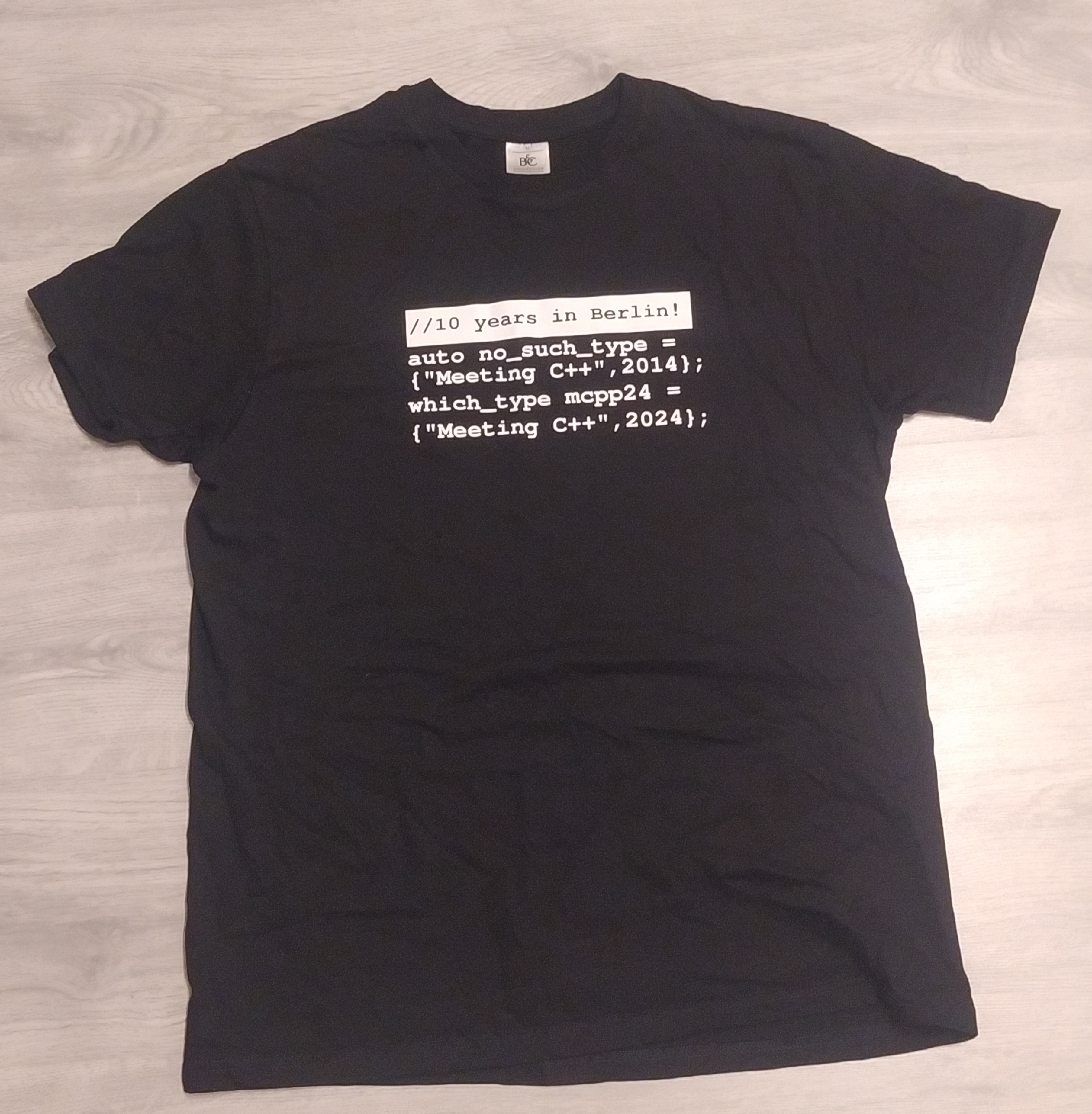
  <li>I quite like my new T-shirt.</li>
</ol>

<div class="responsive-image " style="text-align: center">
  
  
  <a href="/assets/images/2024-11-17-meeting-cpp-tshirt.jpg" aria-label="Open photo: meeting C++ 2025 t-shirt">
    <picture>
      <source type="image/avif" srcset="/assets/responsive/images/240.2024-11-17-meeting-cpp-tshirt.jpg.avif 240w,
/assets/responsive/images/400.2024-11-17-meeting-cpp-tshirt.jpg.avif 400w,
/assets/responsive/images/800.2024-11-17-meeting-cpp-tshirt.jpg.avif 800w,
/assets/responsive/images/1200.2024-11-17-meeting-cpp-tshirt.jpg.avif 1200w,
/assets/responsive/images/1600.2024-11-17-meeting-cpp-tshirt.jpg.avif 1600w,
/assets/responsive/images/2400.2024-11-17-meeting-cpp-tshirt.jpg.avif 2400w,
/assets/responsive/images/3615.2024-11-17-meeting-cpp-tshirt.jpg.avif 3615w,
" sizes="min(calc(100vw - 60px), 800px)" />

      <img src="/assets/images/2024-11-17-meeting-cpp-tshirt.jpg" alt="meeting C++ 2025 t-shirt" />
    </picture>
  </a>

  
</div>

<div class="footnotes" role="doc-endnotes">
  <ol>
    <li id="fn:1">
      <p>Or online. If we didn’t meet in person and you would like to talk to me, you can
always reach me on LinkedIn or by sending me an email. <a href="#fnref:1" class="reversefootnote" role="doc-backlink">&#8617;</a></p>
    </li>
    <li id="fn:2">
      <p>It’s easier for people to complain. <a href="#fnref:2" class="reversefootnote" role="doc-backlink">&#8617;</a></p>
    </li>
    <li id="fn:3">
      <p>In <a href="https://www.codasip.com">Codasip</a> we are doing cool RISC-V and EDA
work. Check us out if you are not aware of us. <a href="#fnref:3" class="reversefootnote" role="doc-backlink">&#8617;</a></p>
    </li>
  </ol>
</div>]]></content><author><name>Charalampos Kardaris</name></author><category term="blog" /><category term="c++" /><category term="conference" /><category term="report" /><summary type="html"><![CDATA[Trip report from Meeting C++ 2025]]></summary></entry><entry><title type="html">Finding the optional truth</title><link href="https://ckardaris.github.io/blog/2024/05/16/finding-the-optional-truth.html" rel="alternate" type="text/html" title="Finding the optional truth" /><published>2024-05-16T00:00:00+00:00</published><updated>2024-05-16T00:00:00+00:00</updated><id>https://ckardaris.github.io/blog/2024/05/16/finding-the-optional-truth</id><content type="html" xml:base="https://ckardaris.github.io/blog/2024/05/16/finding-the-optional-truth.html"><![CDATA[<p>Using a programming language <em>can</em> be an easy task<sup id="fnref:1"><a href="#fn:1" class="footnote" rel="footnote" role="doc-noteref">1</a></sup>. Understanding it deeply
and mastering it, though, is more challenging. Multiple definitions of the word
apply here: <em>demanding</em> and <em>stimulating</em>.</p>

<p>I have been trying to utilize all available features of C++ as much as possible.
One that I particularly like is <code class="language-plaintext highlighter-rouge">std::optional</code><sup id="fnref:2"><a href="#fn:2" class="footnote" rel="footnote" role="doc-noteref">2</a></sup>. I am fond of its semantics.
Here is something that may contain a value, or it may as well contain nothing.
This <em>nothing</em> is also known as <code class="language-plaintext highlighter-rouge">std::nullopt</code>. <code class="language-plaintext highlighter-rouge">std::optional</code> removes the need
of returning raw pointers and relying on comparisons with <code class="language-plaintext highlighter-rouge">nullptr</code> in order to
check if the return value of a function is valid or not.</p>

<p>I must say I have not been using <code class="language-plaintext highlighter-rouge">std::optional</code> extensively, so I am yet to
discover all its edges. But recently, I had to interact with it a little more
and learned something along the way.</p>

<h1 id="pseudocode">Pseudocode</h1>

<p>Let’s start by writing a small example to describe my thought process.</p>

<div class="language-c++ highlighter-rouge"><div class="highlight"><pre class="highlight"><code><span class="cp">#include</span> <span class="cpf">&lt;string&gt;</span><span class="cp">
#include</span> <span class="cpf">&lt;optional&gt;</span><span class="cp">
</span>
<span class="n">std</span><span class="o">::</span><span class="n">optional</span><span class="o">&lt;</span><span class="n">std</span><span class="o">::</span><span class="n">string</span><span class="o">&gt;</span> <span class="n">ParseMessage</span><span class="p">(</span><span class="k">const</span> <span class="n">std</span><span class="o">::</span><span class="n">string</span><span class="o">&amp;</span> <span class="n">msg</span><span class="p">)</span>
<span class="p">{</span>
    <span class="k">if</span> <span class="p">(</span><span class="n">msg</span><span class="p">.</span><span class="n">empty</span><span class="p">())</span>
    <span class="p">{</span>
        <span class="k">return</span> <span class="n">std</span><span class="o">::</span><span class="n">nullopt</span><span class="p">;</span>
    <span class="p">}</span>
    <span class="k">return</span> <span class="n">msg</span><span class="p">;</span>
<span class="p">}</span>

<span class="kt">int</span> <span class="nf">main</span><span class="p">()</span>
<span class="p">{</span>
    <span class="k">auto</span> <span class="n">myMsg</span> <span class="o">=</span> <span class="n">ParseMessage</span><span class="p">(</span><span class="s">"Hello World"</span><span class="p">);</span>
<span class="p">}</span>
</code></pre></div></div>

<p>The most explicit way to print the above message is:</p>

<div class="language-c++ highlighter-rouge"><div class="highlight"><pre class="highlight"><code><span class="k">if</span> <span class="p">(</span><span class="n">myMsg</span><span class="p">.</span><span class="n">has_value</span><span class="p">())</span>
<span class="p">{</span>
    <span class="n">std</span><span class="o">::</span><span class="n">cout</span> <span class="o">&lt;&lt;</span> <span class="n">myMsg</span><span class="p">.</span><span class="n">value</span><span class="p">()</span> <span class="o">&lt;&lt;</span> <span class="s">"</span><span class="se">\n</span><span class="s">"</span><span class="p">;</span>
<span class="p">}</span>
</code></pre></div></div>

<p>Of course, in this small example, we could have skipped the check. But in the
real world, we always have to ensure that the value is there. Otherwise, an
exception – when using <code class="language-plaintext highlighter-rouge">.value()</code> – or undefined behavior – when directly
dereferencing the <code class="language-plaintext highlighter-rouge">std::optional</code> – is on the table.</p>

<p>Knowing all these, I filled my code with <code class="language-plaintext highlighter-rouge">.has_value()</code> and <code class="language-plaintext highlighter-rouge">.value()</code> calls. I
knew it was correct, but it was also quite cumbersome. There must have been an
easier way to write this.</p>

<p>Looking online, I saw some examples that were doing something akin to:</p>

<div class="language-c++ highlighter-rouge"><div class="highlight"><pre class="highlight"><code><span class="k">if</span> <span class="p">(</span><span class="n">myMsg</span><span class="p">)</span>
<span class="p">{</span>
    <span class="n">std</span><span class="o">::</span><span class="n">cout</span> <span class="o">&lt;&lt;</span> <span class="o">*</span><span class="n">myMsg</span> <span class="o">&lt;&lt;</span> <span class="s">"</span><span class="se">\n</span><span class="s">"</span><span class="p">;</span>
<span class="p">}</span>
</code></pre></div></div>

<p>This is what I was looking for. Not only is this a lot simpler to write, but it
permits you to reuse old code that uses the <em>nullptr-for-no-value</em> pattern,
just by changing the type from <code class="language-plaintext highlighter-rouge">T*</code> to <code class="language-plaintext highlighter-rouge">std::optional&lt;T&gt;</code> in the code.</p>

<p>Equipped with my newly found knowledge, I removed all calls to <code class="language-plaintext highlighter-rouge">has_value()</code> and
replaced all calls to <code class="language-plaintext highlighter-rouge">value()</code> with direct dereferencing using <code class="language-plaintext highlighter-rouge">operator*</code>.</p>

<h1 id="surprise">Surprise</h1>

<p>Unfortunately, I was greeted with a compiler error.</p>

<div class="language-plaintext highlighter-rouge"><div class="highlight"><pre class="highlight"><code>error: cannot convert 'std::optional&lt;T&gt;' to 'bool'
</code></pre></div></div>

<p>The code in question was trying to do something like the following:</p>

<div class="language-c++ highlighter-rouge"><div class="highlight"><pre class="highlight"><code><span class="kt">void</span> <span class="nf">Check</span><span class="p">(</span><span class="kt">bool</span> <span class="n">value</span><span class="p">);</span>

<span class="kt">void</span> <span class="nf">Run</span><span class="p">()</span>
<span class="p">{</span>
    <span class="p">...</span>
    <span class="n">Check</span><span class="p">(</span><span class="n">myOptionalValue</span><span class="p">);</span>
    <span class="p">...</span>
<span class="p">}</span>
</code></pre></div></div>

<p>The message was clear. But why did it not work? Converting to a
<code class="language-plaintext highlighter-rouge">bool</code> in the condition of the <code class="language-plaintext highlighter-rouge">if</code> statement is certainly possible.</p>

<h1 id="truth">Truth</h1>

<p>It turns out – as always – this is all by design. To answer my questions, I
had to read the available specification on <em>cppreference.com</em> a little more
carefully.</p>

<blockquote>
  <p>When an object of type optional&lt;T&gt; is <strong>contextually converted to bool</strong> <sup id="fnref:3"><a href="#fn:3" class="footnote" rel="footnote" role="doc-noteref">3</a></sup>,
the conversion returns true if the object contains a value and false if it
does not contain a value.</p>
</blockquote>

<p>I was not sure what <strong>“contextually”</strong> meant, so I followed the link, and
I was presented with the following introductory text.</p>

<blockquote>
  <p><strong>Implicit conversions</strong> are performed whenever an expression of some type T1 is used in context that does not accept that type, but accepts some other type T2; in particular:</p>
  <ul>
    <li>when the expression is used as the <strong>argument</strong> when calling a function that is declared with T2 as parameter;</li>
    <li>when the expression is used as an <strong>operand</strong> with an operator that expects T2;</li>
    <li>when <strong>initializing</strong> a new object of type T2, including return statement in a function returning T2;</li>
    <li>when the expression is used in a <strong>switch</strong> statement (T2 is integral type);</li>
    <li>when the expression is used in an <strong>if</strong> statement or a <strong>loop</strong> (T2 is bool).</li>
  </ul>
</blockquote>

<p>It seemed to explain my situation. The last bullet must be what permits the
usage of <code class="language-plaintext highlighter-rouge">std::optional</code> in <code class="language-plaintext highlighter-rouge">if</code> statements.</p>

<p>But wait a minute.</p>

<p>The first bullet should cover the function parameter scenario, too. Obviously,
this was not the case. I was missing something.</p>

<p>The magic word is <strong>“implicit”</strong>.</p>

<p>The <code class="language-plaintext highlighter-rouge">std::optional</code> class defines the following conversion function to
<code class="language-plaintext highlighter-rouge">bool</code>:</p>

<div class="language-c++ highlighter-rouge"><div class="highlight"><pre class="highlight"><code><span class="k">constexpr</span> <span class="k">explicit</span> <span class="k">operator</span> <span class="kt">bool</span><span class="p">()</span> <span class="k">const</span> <span class="k">noexcept</span>
</code></pre></div></div>

<p>It is clearly marked as <code class="language-plaintext highlighter-rouge">explicit</code>, so implicit conversions do not consider it.</p>

<p>I thought to myself:</p>

<blockquote>
  <p>How, then, does the conversion to ‘bool’ take place in the ‘if’ condition?</p>
</blockquote>

<p>I had to keep reading. Further below was the answer to my question about the
meaning of <strong>“contextually”</strong>.</p>

<blockquote>
  <p><strong>Contextual conversions</strong></p>

  <p>In the following contexts, the type ‘bool’ is expected and the implicit
conversion is performed if the declaration ‘bool t(e)’ is well-formed (that is,
an explicit conversion function such as ‘explicit T::operator bool() const’ is
considered). Such expression ‘e’ is said to be <strong>contextually converted to
bool</strong>.</p>

  <p>Since C++11:</p>
  <ul>
    <li>the controlling expression of <strong>if</strong>, <strong>while</strong>, <strong>for</strong></li>
    <li>the operands of the built-in logical operators <strong>!</strong>, <strong>&amp;&amp;</strong> and <strong>||</strong></li>
    <li>the first operand of the conditional operator <strong>?:</strong></li>
    <li>the predicate in a <strong>static_assert</strong> declaration</li>
    <li>the expression in a <strong>noexcept</strong> specifier</li>
  </ul>

  <p>Since C++20:</p>
  <ul>
    <li>the expression in an <strong>explicit</strong> specifier</li>
  </ul>
</blockquote>

<p>It turns out that, when a boolean expression is required for defining a
condition – one would say, in a <em>conditional context</em> –, explicit conversion
functions to <code class="language-plaintext highlighter-rouge">bool</code> are considered as well.</p>

<h1 id="lesson">Lesson</h1>

<p>I don’t want to focus on the minefield that is modern C++ syntax and rules.
People smarter and more knowledgeable than me have expressed, and will continue
to express, their opinions on the language. All I want to say is that, as a
deeply inquiring mind, I was quite fascinated to discover this little sub-rule,
which ultimately expanded my knowledge.</p>
<div class="footnotes" role="doc-endnotes">
  <ol>
    <li id="fn:1">
      <p>Depending on which one you pick, of course. <a href="#fnref:1" class="reversefootnote" role="doc-backlink">&#8617;</a></p>
    </li>
    <li id="fn:2">
      <p>See <a href="https://en.cppreference.com/w/cpp/utility/optional">cppreference.com/…/optional</a>. <a href="#fnref:2" class="reversefootnote" role="doc-backlink">&#8617;</a></p>
    </li>
    <li id="fn:3">
      <p>See <a href="https://en.cppreference.com/w/cpp/language/implicit_conversion">cppreference.com/…/language/implicit_conversion</a>. <a href="#fnref:3" class="reversefootnote" role="doc-backlink">&#8617;</a></p>
    </li>
  </ol>
</div>]]></content><author><name>Charalampos Kardaris</name></author><category term="blog" /><category term="c++" /><category term="programming" /><summary type="html"><![CDATA[Discovering a little more about C++ and std::optional]]></summary></entry><entry><title type="html">ChatGPT and the web ignorant</title><link href="https://ckardaris.github.io/blog/2024/05/09/chatgpt-and-the-web-ignorant.html" rel="alternate" type="text/html" title="ChatGPT and the web ignorant" /><published>2024-05-09T00:00:00+00:00</published><updated>2024-05-09T00:00:00+00:00</updated><id>https://ckardaris.github.io/blog/2024/05/09/chatgpt-and-the-web-ignorant</id><content type="html" xml:base="https://ckardaris.github.io/blog/2024/05/09/chatgpt-and-the-web-ignorant.html"><![CDATA[<p>The first time I used ChatGPT I was astounded. Here was something that felt like
magic. Since then, a lot more information has been made available about LLMs in
general. Us laymen have peeked inside the magician’s hat. We know more about
their capabilities and shortcomings. We know that they can hallucinate at times
and that their output should be used with care. But the point still remains;
what ChatGPT and the rest of the LLMs offer is awesome.</p>

<p>I mostly use ChatGPT for my programming tasks. While learning new concepts, it
has mostly replaced searching the web for me. I prefer its clean interface: a
question followed by an answer. Most times the answer is on point, something you
don’t get out of a traditional search engine these days. The top-ranked
SEO-heavy posts create an additional burden on me to filter them, which is not
always an easy task, or a worthwhile one. For specific technical matters, I
still prefer to directly visit the reference or documentation websites<sup id="fnref:1"><a href="#fn:1" class="footnote" rel="footnote" role="doc-noteref">1</a></sup>.</p>

<p>I first set up this personal website two years ago. I realised that GitHub
pages would be a simple way to go about it. I set up Jekyll and started
tinkering with a theme<sup id="fnref:2"><a href="#fn:2" class="footnote" rel="footnote" role="doc-noteref">2</a></sup>. Initially hesitant to begin posting, I uploaded
some of my photography and left it at that.</p>

<p>About two weeks ago, I decided that I wanted to bring some life back into it. I
set up my local environment again and started improving the website, bit by bit.
I introduced post tags and tag pages<sup id="fnref:3"><a href="#fn:3" class="footnote" rel="footnote" role="doc-noteref">3</a></sup>. I uploaded my first
<a href="/blog/2024/05/04/see-you-at-the-library.html">post</a>.</p>

<p>One thing remained and I would be set: a better gallery view for my
<a href="/photography">photos</a>. From the first moment, I wanted to have a grid view.
However, I am not very proficient in CSS and, at the time, I could not make it
work as I wanted. I put my photos in a single column and called it a day.</p>

<div class="responsive-image " style="text-align: center">
  
  
  <a href="/assets/images/2024-05-06-chatgpt-stories-helping-a-ruby-ignorant-0.png" aria-label="Open photo: Single column photo gallery">
    <picture>
      <source type="image/avif" srcset="/assets/responsive/images/240.2024-05-06-chatgpt-stories-helping-a-ruby-ignorant-0.png.avif 240w,
/assets/responsive/images/400.2024-05-06-chatgpt-stories-helping-a-ruby-ignorant-0.png.avif 400w,
/assets/responsive/images/728.2024-05-06-chatgpt-stories-helping-a-ruby-ignorant-0.png.avif 728w,
" sizes="min(calc(100vw - 60px), 800px)" />

      <img src="/assets/images/2024-05-06-chatgpt-stories-helping-a-ruby-ignorant-0.png" alt="Single column photo gallery" loading="eager" />
    </picture>
  </a>

  
</div>

<p>Enter ChatGPT.</p>

<blockquote>
  <p>I want to put photos in a three column grid. When the screen size reduces, I
want it to be responsive. What is the proper way to do it?</p>
</blockquote>

<p>ChatGPT replied.</p>
<div class="language-html highlighter-rouge"><div class="highlight"><pre class="highlight"><code><span class="nt">&lt;div</span> <span class="na">class=</span><span class="s">"grid-container"</span><span class="nt">&gt;</span>
  <span class="nt">&lt;div</span> <span class="na">class=</span><span class="s">"grid-item"</span><span class="nt">&gt;&lt;img</span> <span class="na">src=</span><span class="s">"photo1.jpg"</span> <span class="na">alt=</span><span class="s">"Photo 1"</span><span class="nt">&gt;&lt;/div&gt;</span>
  <span class="nt">&lt;div</span> <span class="na">class=</span><span class="s">"grid-item"</span><span class="nt">&gt;&lt;img</span> <span class="na">src=</span><span class="s">"photo2.jpg"</span> <span class="na">alt=</span><span class="s">"Photo 2"</span><span class="nt">&gt;&lt;/div&gt;</span>
  <span class="nt">&lt;div</span> <span class="na">class=</span><span class="s">"grid-item"</span><span class="nt">&gt;&lt;img</span> <span class="na">src=</span><span class="s">"photo3.jpg"</span> <span class="na">alt=</span><span class="s">"Photo 3"</span><span class="nt">&gt;&lt;/div&gt;</span>
  <span class="c">&lt;!-- Add more grid items as needed --&gt;</span>
<span class="nt">&lt;/div&gt;</span>
</code></pre></div></div>
<p>and</p>
<div class="language-css highlighter-rouge"><div class="highlight"><pre class="highlight"><code><span class="nc">.grid-container</span> <span class="p">{</span>
  <span class="nl">display</span><span class="p">:</span> <span class="nb">grid</span><span class="p">;</span>
  <span class="nl">grid-template-columns</span><span class="p">:</span> <span class="nf">repeat</span><span class="p">(</span><span class="nb">auto-fit</span><span class="p">,</span> <span class="nf">minmax</span><span class="p">(</span><span class="m">300px</span><span class="p">,</span> <span class="m">1fr</span><span class="p">));</span>
  <span class="py">grid-gap</span><span class="p">:</span> <span class="m">10px</span><span class="p">;</span>
<span class="p">}</span>

<span class="nc">.grid-item</span> <span class="p">{</span>
  <span class="nl">width</span><span class="p">:</span> <span class="m">100%</span><span class="p">;</span>
<span class="p">}</span>
</code></pre></div></div>
<p>It worked on the first try. I took it from there. I knew how to proceed. I
adjusted my Jekyll templates accordingly and changed the <code class="language-plaintext highlighter-rouge">minmax</code> value, in
order to fit three photos in the widest layout. I finally had a nicely looking
photo gallery. I even added captions to all the photos. Cool!</p>

<div class="responsive-image " style="text-align: center">
  
  
  <a href="/assets/images/2024-05-06-chatgpt-stories-helping-a-ruby-ignorant-1.png" aria-label="Open photo: Grid gallery">
    <picture>
      <source type="image/avif" srcset="/assets/responsive/images/240.2024-05-06-chatgpt-stories-helping-a-ruby-ignorant-1.png.avif 240w,
/assets/responsive/images/400.2024-05-06-chatgpt-stories-helping-a-ruby-ignorant-1.png.avif 400w,
/assets/responsive/images/719.2024-05-06-chatgpt-stories-helping-a-ruby-ignorant-1.png.avif 719w,
" sizes="min(calc(100vw - 60px), 800px)" />

      <img src="/assets/images/2024-05-06-chatgpt-stories-helping-a-ruby-ignorant-1.png" alt="Grid gallery" />
    </picture>
  </a>

  
</div>

<p>Initially, by clicking on each photo, the original full-size photo was shown. I
thought that this was not very optimal, since a lot of network data needed to be
transferred. Most of my photos are taken with my Nikon D3400 DSLR camera and
their size can be up to 20MB. The solution would be to show some smaller version
of each photo initially, and only display the full-size version after a second
click.</p>

<p>I thought to myself, “I want each photo to have its own page. How do I do
that?”. I knew that it was possible to do it. My tags plugin is generating
pages for all post tags.</p>

<p>Enter ChatGPT. Again.</p>

<blockquote>
  <p>Let’s say I have a list of photos in a Jekyll website as a data file. I want
to create a page for each photo, where you can see the photo and links to the
previous and next photo will navigate you along the list.</p>
</blockquote>

<p>ChatGPT produced some valid HTML that I could work with, but the rest of the
code was not up to the task. It did not help much with the Jekyll integration
part. After a quick look around the web and the Jekyll documentation, I
understood I needed to write a custom plugin<sup id="fnref:5"><a href="#fn:5" class="footnote" rel="footnote" role="doc-noteref">4</a></sup>.</p>

<blockquote>
  <p>Your suggestions so far are not working. I think I need to write a custom
plugin.</p>
</blockquote>

<p>After the usual ChatGPT answer intro, I got the coveted code.</p>

<div class="language-rb highlighter-rouge"><div class="highlight"><pre class="highlight"><code><span class="k">module</span> <span class="nn">Jekyll</span>
  <span class="k">class</span> <span class="nc">PhotoPagesGenerator</span> <span class="o">&lt;</span> <span class="no">Generator</span>
    <span class="n">safe</span> <span class="kp">true</span>
    <span class="n">priority</span> <span class="ss">:normal</span>

    <span class="k">def</span> <span class="nf">generate</span><span class="p">(</span><span class="n">site</span><span class="p">)</span>
      <span class="n">photos</span> <span class="o">=</span> <span class="n">site</span><span class="p">.</span><span class="nf">data</span><span class="p">[</span><span class="s1">'photos'</span><span class="p">]</span>
      <span class="n">photos</span><span class="p">.</span><span class="nf">each_with_index</span> <span class="k">do</span> <span class="o">|</span><span class="n">photo</span><span class="p">,</span> <span class="n">index</span><span class="o">|</span>
        <span class="n">previous_photo</span> <span class="o">=</span> <span class="n">index</span> <span class="o">&gt;</span> <span class="mi">0</span> <span class="p">?</span> <span class="n">photos</span><span class="p">[</span><span class="n">index</span> <span class="o">-</span> <span class="mi">1</span><span class="p">]</span> <span class="p">:</span> <span class="kp">nil</span>
        <span class="n">next_photo</span> <span class="o">=</span> <span class="n">index</span> <span class="o">&lt;</span> <span class="n">photos</span><span class="p">.</span><span class="nf">size</span> <span class="o">-</span> <span class="mi">1</span> <span class="p">?</span> <span class="n">photos</span><span class="p">[</span><span class="n">index</span> <span class="o">+</span> <span class="mi">1</span><span class="p">]</span> <span class="p">:</span> <span class="kp">nil</span>

        <span class="n">site</span><span class="p">.</span><span class="nf">pages</span> <span class="o">&lt;&lt;</span> <span class="n">photoPage</span><span class="p">.</span><span class="nf">new</span><span class="p">(</span><span class="n">site</span><span class="p">,</span> <span class="n">photo</span><span class="p">,</span> <span class="n">previous_photo</span><span class="p">,</span> <span class="n">next_photo</span><span class="p">)</span>
      <span class="k">end</span>
    <span class="k">end</span>
  <span class="k">end</span>

  <span class="k">class</span> <span class="n">photoPage</span> <span class="o">&lt;</span> <span class="no">Page</span>
    <span class="k">def</span> <span class="nf">initialize</span><span class="p">(</span><span class="n">site</span><span class="p">,</span> <span class="n">photo</span><span class="p">,</span> <span class="n">previous_photo</span><span class="p">,</span> <span class="n">next_photo</span><span class="p">)</span>
      <span class="vi">@site</span> <span class="o">=</span> <span class="n">site</span>
      <span class="vi">@base</span> <span class="o">=</span> <span class="n">site</span><span class="p">.</span><span class="nf">source</span>
      <span class="vi">@dir</span> <span class="o">=</span> <span class="s1">''</span> <span class="c1"># Set the directory where you want the pages to be generated</span>
      <span class="vi">@name</span> <span class="o">=</span> <span class="n">photo</span><span class="p">[</span><span class="s1">'url'</span><span class="p">]</span> <span class="c1"># Use the photo URL as the page name</span>

      <span class="nb">self</span><span class="p">.</span><span class="nf">process</span><span class="p">(</span><span class="vi">@name</span><span class="p">)</span>
      <span class="nb">self</span><span class="p">.</span><span class="nf">data</span> <span class="o">=</span> <span class="p">{</span>
        <span class="s1">'layout'</span> <span class="o">=&gt;</span> <span class="s1">'photo_page'</span><span class="p">,</span>
        <span class="s1">'title'</span> <span class="o">=&gt;</span> <span class="n">photo</span><span class="p">[</span><span class="s1">'caption'</span><span class="p">],</span>
        <span class="s1">'photo'</span> <span class="o">=&gt;</span> <span class="n">photo</span><span class="p">,</span>
        <span class="s1">'previous_photo'</span> <span class="o">=&gt;</span> <span class="n">previous_photo</span><span class="p">,</span>
        <span class="s1">'next_photo'</span> <span class="o">=&gt;</span> <span class="n">next_photo</span>
      <span class="p">}</span>
    <span class="k">end</span>
  <span class="k">end</span>
<span class="k">end</span>
</code></pre></div></div>
<p>Voila! Once more, I made the necessary edits. I introduced wrapping around after
reaching the end of the photo list, simplified the code, based on the official
Jekyll documentation for generators, and set the correct path for the photos to
be shown.</p>

<div class="language-rb highlighter-rouge"><div class="highlight"><pre class="highlight"><code><span class="k">module</span> <span class="nn">Jekyll</span>
  <span class="k">class</span> <span class="nc">PhotoPagesGenerator</span> <span class="o">&lt;</span> <span class="no">Generator</span>
    <span class="n">safe</span> <span class="kp">true</span>
    <span class="n">priority</span> <span class="ss">:normal</span>

    <span class="k">def</span> <span class="nf">generate</span><span class="p">(</span><span class="n">site</span><span class="p">)</span>
      <span class="n">photos</span> <span class="o">=</span> <span class="n">site</span><span class="p">.</span><span class="nf">data</span><span class="p">[</span><span class="s1">'photos'</span><span class="p">]</span>
      <span class="n">photos</span><span class="p">.</span><span class="nf">each_with_index</span> <span class="k">do</span> <span class="o">|</span><span class="n">photo</span><span class="p">,</span> <span class="n">index</span><span class="o">|</span>
        <span class="n">previous_photo</span> <span class="o">=</span> <span class="n">photos</span><span class="p">[(</span><span class="n">index</span> <span class="o">-</span> <span class="mi">1</span><span class="p">)</span> <span class="o">%</span> <span class="n">photos</span><span class="p">.</span><span class="nf">size</span><span class="p">]</span>
        <span class="n">next_photo</span> <span class="o">=</span> <span class="n">photos</span><span class="p">[(</span><span class="n">index</span> <span class="o">+</span> <span class="mi">1</span><span class="p">)</span> <span class="o">%</span> <span class="n">photos</span><span class="p">.</span><span class="nf">size</span><span class="p">]</span>

        <span class="n">site</span><span class="p">.</span><span class="nf">pages</span> <span class="o">&lt;&lt;</span> <span class="no">PhotoPage</span><span class="p">.</span><span class="nf">new</span><span class="p">(</span><span class="n">site</span><span class="p">,</span> <span class="n">photo</span><span class="p">,</span> <span class="n">previous_photo</span><span class="p">,</span> <span class="n">next_photo</span><span class="p">,</span> <span class="n">index</span><span class="p">)</span>
      <span class="k">end</span>
    <span class="k">end</span>
  <span class="k">end</span>

  <span class="k">class</span> <span class="nc">PhotoPage</span> <span class="o">&lt;</span> <span class="no">Page</span>
    <span class="k">def</span> <span class="nf">initialize</span><span class="p">(</span><span class="n">site</span><span class="p">,</span> <span class="n">photo</span><span class="p">,</span> <span class="n">previous_photo</span><span class="p">,</span> <span class="n">next_photo</span><span class="p">,</span> <span class="n">index</span><span class="p">)</span>
      <span class="vi">@site</span> <span class="o">=</span> <span class="n">site</span>
      <span class="vi">@base</span> <span class="o">=</span> <span class="n">site</span><span class="p">.</span><span class="nf">source</span>
      <span class="vi">@dir</span> <span class="o">=</span> <span class="s2">"/photography/"</span> <span class="o">+</span> <span class="n">photo</span><span class="p">[</span><span class="s2">"name"</span><span class="p">]</span>
      <span class="vi">@basename</span> <span class="o">=</span> <span class="s1">'index'</span>
      <span class="vi">@ext</span>      <span class="o">=</span> <span class="s1">'.html'</span>
      <span class="vi">@name</span>     <span class="o">=</span> <span class="s1">'index.html'</span>

      <span class="nb">self</span><span class="p">.</span><span class="nf">process</span><span class="p">(</span><span class="vi">@name</span><span class="p">)</span>
      <span class="nb">self</span><span class="p">.</span><span class="nf">data</span> <span class="o">=</span> <span class="p">{</span>
        <span class="s1">'layout'</span> <span class="o">=&gt;</span> <span class="s1">'photo_page'</span><span class="p">,</span>
        <span class="s1">'title'</span> <span class="o">=&gt;</span> <span class="n">photo</span><span class="p">[</span><span class="s2">"caption"</span><span class="p">],</span>
        <span class="s1">'photo'</span> <span class="o">=&gt;</span> <span class="n">photo</span><span class="p">,</span>
        <span class="s1">'previous_photo'</span> <span class="o">=&gt;</span> <span class="n">previous_photo</span><span class="p">,</span>
        <span class="s1">'next_photo'</span> <span class="o">=&gt;</span> <span class="n">next_photo</span><span class="p">,</span>
        <span class="s1">'index'</span> <span class="o">=&gt;</span> <span class="n">index</span> <span class="o">+</span> <span class="mi">1</span>  <span class="c1"># increment to start from 1,</span>
      <span class="p">}</span>
    <span class="k">end</span>
  <span class="k">end</span>
<span class="k">end</span>
</code></pre></div></div>

<p>I finally had it. I struggled a little more than with the CSS grid code, but I
had it. A page for every one of my photos. Enthusiastically, I uploaded the
changes.</p>

<div class="responsive-image " style="text-align: center">
  
  
  <a href="/assets/images/2024-05-06-chatgpt-stories-helping-a-ruby-ignorant-2.png" aria-label="Open photo: Photo page">
    <picture>
      <source type="image/avif" srcset="/assets/responsive/images/240.2024-05-06-chatgpt-stories-helping-a-ruby-ignorant-2.png.avif 240w,
/assets/responsive/images/400.2024-05-06-chatgpt-stories-helping-a-ruby-ignorant-2.png.avif 400w,
/assets/responsive/images/738.2024-05-06-chatgpt-stories-helping-a-ruby-ignorant-2.png.avif 738w,
" sizes="min(calc(100vw - 60px), 800px)" />

      <img src="/assets/images/2024-05-06-chatgpt-stories-helping-a-ruby-ignorant-2.png" alt="Photo page" />
    </picture>
  </a>

  
</div>

<p>I am really satisfied with the outcome. I find it amazing how helpful ChatGPT
can be, if you have a rough idea of what you want to achieve, you know the right
keywords to use in your query and are willing to play a little with the code
afterwards. And, testament to its value, I consider it as a great companion in
my tech endeavours and look forward to further exploring its powers.</p>
<div class="footnotes" role="doc-endnotes">
  <ol>
    <li id="fn:1">
      <p>I am programming in C++ at work, so I frequently visit
<a href="https://cppreference.com">cppreference.com</a>. <a href="#fnref:1" class="reversefootnote" role="doc-backlink">&#8617;</a></p>
    </li>
    <li id="fn:2">
      <p>This website is based on the <a href="https://github.com/jekyll/minima">minima</a>
theme. <a href="#fnref:2" class="reversefootnote" role="doc-backlink">&#8617;</a></p>
    </li>
    <li id="fn:3">
      <p>I am using <a href="https://github.com/pattex/jekyll-tagging">jekyll-tagging</a>. <a href="#fnref:3" class="reversefootnote" role="doc-backlink">&#8617;</a></p>
    </li>
    <li id="fn:5">
      <p>Maybe there is a more elegant way to do it. Suggestions are welcome. <a href="#fnref:5" class="reversefootnote" role="doc-backlink">&#8617;</a></p>
    </li>
  </ol>
</div>]]></content><author><name>Charalampos Kardaris</name></author><category term="blog" /><category term="jekyll" /><category term="programming" /><category term="website" /><summary type="html"><![CDATA[How ChatGPT helped me configure my Jekyll static website]]></summary></entry><entry><title type="html">See you at the library</title><link href="https://ckardaris.github.io/blog/2024/05/04/see-you-at-the-library.html" rel="alternate" type="text/html" title="See you at the library" /><published>2024-05-04T00:00:00+00:00</published><updated>2024-05-04T00:00:00+00:00</updated><id>https://ckardaris.github.io/blog/2024/05/04/see-you-at-the-library</id><content type="html" xml:base="https://ckardaris.github.io/blog/2024/05/04/see-you-at-the-library.html"><![CDATA[<p>I was recently travelling again. On the first day of the trip, I had to work,
but the hostel I was staying at did not have any quiet space for that purpose.
I tried to use the common room; however, the morning cheers of vacationing
children did not provide an ideal working environment.</p>

<p>I had to evaluate my options. Many people working remotely go to cafés. They
enjoy a cup of coffee and a piece of cake and hopefully something else
later<sup id="fnref:1"><a href="#fn:1" class="footnote" rel="footnote" role="doc-noteref">1</a></sup>, until it is time to call it a day. Visiting the city for the first
time, I had no idea where to find good cafés for working. I didn’t want to
spend more time searching for a suitable place, when I should have already been
working. So, I decided to play it safe.</p>

<p>In the maps application on my phone, I entered:</p>
<blockquote>
  <p>library</p>
</blockquote>

<p>Libraries have always held a soft spot in my heart. I am a book aficionado and
love learning new stuff, so a place that contains such a variety of books and
knowledge naturally appeals to me. Despite this, I hadn’t visited a library
with the intention of spending some productive time there in nearly five years.
It was during my last year of studies. Before the whole Covid-19 adventure.</p>

<p>I scanned the map on my phone for a library within walking distance and was
satisfied that the main library of the city was only 1.5 kilometre down the
street. I packed my laptop and headed towards there.</p>

<p>The first visit to a previously unknown library is a pleasant experience for
me.  It mostly comes down to the curiosity about the arrangement of the books,
the availability of working spaces and, most importantly, the people that are
already there. I did a brief tour around. I was looking for a suitable place to
“camp”, while quickly observing the other library visitors. Some working alone,
some students on a group project, some on the public computers.</p>

<p>I soon had my spot. I unpacked my stuff and started working. I like to have my
headphones on, when working in public spaces. But I don’t want to block all
outside sounds. I like knowing that the environment around me is lively. It
gives me a sense of purpose.</p>

<p>I believe that the collective focus of people working or studying, even though
they do not interact directly with one another, has an interesting effect which
in turn makes me more focused on my work. It is what makes libraries unique.
They are not just buildings or places of public service, but a vibrant social
environment. It is also why I don’t plan to wait for five more years before my
next visit.</p>

<p>You should not wait either. If you ever need a change of scenery when working,
you know what to do. Open the maps application on your phone<sup id="fnref:2"><a href="#fn:2" class="footnote" rel="footnote" role="doc-noteref">2</a></sup> and enter the
magic word:</p>
<blockquote>
  <p>library</p>
</blockquote>

<p>See you there.</p>
<div class="footnotes" role="doc-endnotes">
  <ol>
    <li id="fn:1">
      <p>Ordering once and staying there for multiple hours is at least rude in my
opinion. <a href="#fnref:1" class="reversefootnote" role="doc-backlink">&#8617;</a></p>
    </li>
    <li id="fn:2">
      <p>Old-school ways of searching are not frowned upon. <a href="#fnref:2" class="reversefootnote" role="doc-backlink">&#8617;</a></p>
    </li>
  </ol>
</div>]]></content><author><name>Charalampos Kardaris</name></author><category term="blog" /><category term="life" /><category term="travel" /><category term="work" /><summary type="html"><![CDATA[Libraries are amazing places. Here are some thoughts of mine about them.]]></summary></entry></feed>